How to Write an SEO Article: Complete Beginner’s Guide
Writing an SEO article does not mean inserting keywords into every paragraph or following a rigid formula.
A useful SEO article begins with a clear understanding of the reader’s problem. It then provides accurate information in the right format, uses a logical structure, and makes the page easy for both users and search engines to access.
This beginner-friendly guide explains the complete process—from choosing a topic and researching search intent to writing, optimizing, publishing, and measuring performance.
What Is an SEO Article?
An SEO article is a webpage created to answer a specific search need while supporting the website’s broader content and business objectives.
It may be:
- A how-to guide
- A definition or explanation
- A comparison
- A checklist
- A troubleshooting article
- A buying guide
- A frequently asked question page
The goal is not only to rank. A strong article should also help the reader understand something, solve a problem, compare options, or take an appropriate next step.
Before You Start Writing
Before choosing keywords or creating an outline, answer four questions:
- Who is the article for?
- What problem does the reader need to solve?
- What type of page are they expecting?
- What should they be able to do after reading?
These questions help prevent a common mistake: writing an informational article for a query that actually requires a product, service, category, comparison, or local page.
Step 1: Research the Topic and Search Intent
Search intent describes what users expect to find after entering a query.
Common intent types include:
- Informational: The user wants to learn or solve a problem.
- Commercial: The user wants to compare products, services, or providers.
- Transactional: The user is ready to purchase, book, or contact.
- Local: The user wants a provider or solution in a specific area.
- Navigational: The user is looking for a particular website or brand.
How to Review Search Intent
Search the main topic and review the current results.
Look for:
- The dominant page type
- The questions commonly answered
- The expected level of detail
- Whether users need instructions, comparisons, products, videos, or tools
- What useful information is missing
The purpose is not to copy competing pages. Use the results to understand user expectations and identify opportunities to add original value.
Step 2: Conduct Keyword Research
Keywords help identify how users describe a topic.
Useful research sources include:
- Google Search Console
- Google Keyword Planner
- Ahrefs
- Semrush
- Ubersuggest
- Google search suggestions
- Customer questions
- Internal site-search data
Choose a Primary Topic
The page should focus on one main search intent rather than a random collection of keywords.
For this guide, a primary topic could be:
How to write an SEO article
Supporting queries may include:
- SEO article writing steps
- SEO writing for beginners
- SEO article structure
- SEO article checklist
Do Not Focus Only on Search Volume
When evaluating a topic, also consider:
- Search intent
- Business relevance
- Competition
- Audience value
- The website’s ability to provide a credible answer
Do Not Use Keyword Density as a Rule
There is no required percentage or repetition count.
Use the main topic and related terminology naturally where they help readers understand the content.
Step 3: Create a Content Brief
A content brief defines what the article needs to achieve before drafting begins.
| Brief element | Example |
|---|---|
| Audience | Beginners learning SEO content writing |
| Search intent | Informational and instructional |
| Primary topic | How to write an SEO article |
| Main outcome | The reader can plan and write a basic SEO article |
| Required sections | Research, outline, writing, optimization, publishing, measurement |
| Internal links | Meta tags, heading tags, content writing, technical SEO |
| Call to action | Apply the checklist or request professional support |
Step 4: Create a Logical Outline
An outline helps keep the article focused and prevents repetition.
Basic SEO Article Structure
- H1: The visible main title of the page
- Introduction: The problem, context, and expected outcome
- H2 sections: Major steps or themes
- H3 sections: Supporting explanations
- Conclusion: Key takeaway and appropriate next step
Not every article needs the same number of headings. The structure should reflect the topic and search intent.
Sample Outline
<h1>How to Write an SEO Article: Beginner’s Guide</h1>

<h2>What Is an SEO Article?</h2>

<h2>Step 1: Research Search Intent</h2>

<h2>Step 2: Conduct Keyword Research</h2>

<h2>Step 3: Create an Outline</h2>

<h2>Step 4: Write the First Draft</h2>

<h2>Step 5: Optimize the Page</h2>

<h2>Step 6: Publish and Measure Performance</h2>
Step 5: Write a Useful Introduction
The introduction should help readers understand immediately:
- What the article is about
- Why the topic matters
- What they will learn
Avoid long promotional openings that delay the answer.
Example Introduction
Are you learning SEO writing but unsure how to turn a keyword into a useful article? This guide explains the complete process—from understanding search intent and creating an outline to optimizing, publishing, and tracking the page.
Step 6: Write the First Draft
During the first draft, focus on accuracy, usefulness, and logical flow.
Do not interrupt every sentence to count keywords or perfect metadata.
Answer the Main Question Early
Readers should not need to scroll through several paragraphs before finding the information promised by the title.
Write for a Defined Reader
A beginner needs definitions, examples, and clear steps. An experienced professional may require technical detail, evidence, and trade-offs.
Use Paragraph Length Based on Clarity
There is no rule requiring every paragraph to contain three to five lines.
Use shorter paragraphs for scanning and longer paragraphs when an idea needs additional explanation.
Use Examples and Evidence
Depending on the topic, include:
- Practical examples
- Screenshots
- Original data
- Expert commentary
- Case studies
- Tables
- Checklists
Do not invent experience, statistics, or customer results.
Step 7: Use Headings Correctly
Heading tags organize the page into a meaningful hierarchy.
- Use H1 for the main page heading.
- Use H2 for major sections.
- Use H3 for subsections within an H2.
- Use H4 only when an H3 needs further subdivision.
Do not select heading levels based on font size. Use CSS to control appearance.
Correct Heading Example
<h1>How to Write an SEO Article</h1>

<h2>Keyword Research</h2>

<h3>How to Evaluate Search Intent</h3>

<h3>How to Choose Supporting Keywords</h3>
Step 8: Use Keywords Naturally
Keywords should help clarify the topic, not make the text repetitive.
They may appear naturally in:
- The title tag
- The H1
- Relevant subheadings
- The introduction
- The body
- Internal-link anchor text
- Metadata
They do not need to appear in every heading, the first sentence, and the conclusion simultaneously.
Step 9: Optimize the Title Tag
The title tag helps identify the document and may appear as the search-result headline.
A useful title should:
- Describe the page accurately
- Communicate a clear benefit
- Use the main topic naturally
- Be distinct from other important pages
- Avoid unsupported promises
There is no universal character limit that guarantees complete display. Search engines may shorten or rewrite a title according to the query, device, and available space.
Example Title Tag
<title>How to Write an SEO Article: Beginner’s Guide</title>
Step 10: Write a Meta Description
The meta description provides a candidate summary for the search snippet.
It should:
- Summarize the visible content
- Explain the page’s value
- Match the likely search intent
- Avoid exaggerated promises
Search engines may display another passage from the page when it better matches the user’s query.
Example Meta Description
<meta name="description"
content="Learn how to write an SEO article from search intent and keyword research to outlining, optimization, publishing, and performance tracking.">
Readers who need a more detailed explanation can review this guide to SEO meta tags.
Step 11: Create a Readable URL
A useful URL is generally:
- Readable
- Relevant to the page
- Stable over time
- Free from unnecessary parameters where practical
Example:
example.com/how-to-write-an-seo-article
Do not change an established URL simply to make it shorter or add a keyword without planning redirects and internal-link updates.
Step 12: Optimize Images
Images should improve understanding, demonstrate a process, or provide useful context.
Review:
- Image dimensions
- File size
- Responsive display
- File format
- Lazy loading
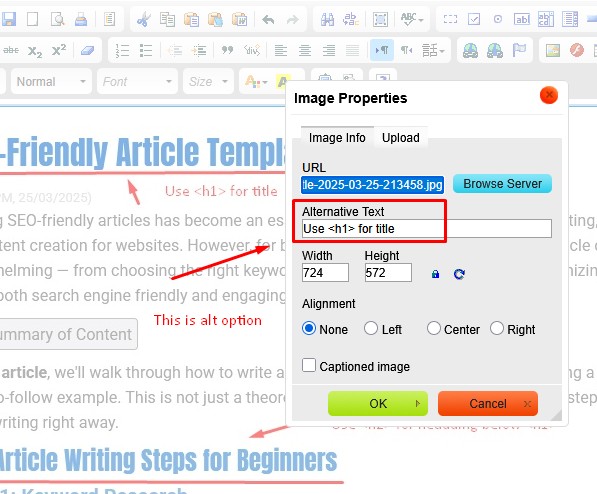
- Alternative text
Alternative text should describe the image for users who cannot see it.
Do not add keywords that do not describe the image.
Example Image HTML
<img src="seo-article-outline.jpg"
  alt="SEO article outline showing introduction, main sections and conclusion"
  width="700"
  height="500"

>
Step 13: Add Internal Links
Internal links help readers discover related information and connect the article to the wider website.
Link to pages that:
- Explain a supporting concept
- Provide the next step
- Answer a related question
- Introduce a relevant product or service
Use descriptive anchor text rather than vague wording such as “click here.”
Step 14: Add External Sources When Needed
External links may support factual claims and help readers verify important information.
Prioritize:
- Official documentation
- Primary research
- Government sources
- Academic publications
- Recognized industry organizations
External links do not automatically improve rankings. They should be included because they improve accuracy and usefulness.
Step 15: Edit and Fact-Check
After completing the draft, review it in several passes.
Content Review
- Does the article answer the main question?
- Is important information missing?
- Are sections repetitive?
- Does the article match search intent?
Accuracy Review
- Verify names and dates.
- Open and confirm sources.
- Check statistics and quotations.
- Review product and technical details.
Language Review
- Correct grammar and spelling.
- Remove vague promotional language.
- Improve unclear sentences.
- Check tone and terminology.
Technical Review
- Check headings.
- Check links.
- Check image display.
- Check metadata.
- Check mobile layout.
Step 16: Publish and Quality-Check
After publishing, open the live page and confirm:
- The page returns a valid status code.
- The title and description are correct.
- Headings are displayed properly.
- Links work.
- Images load.
- Tables work on mobile.
- The page is not accidentally set to noindex.
- The canonical URL is correct.
Step 17: Help Search Engines Discover the Page
Search engines may discover the page through:
- Internal links
- XML sitemaps
- Website navigation
- External links
You may use URL Inspection in Google Search Console to check the page and request indexing for an important new or updated URL.
Requesting indexing does not guarantee inclusion or higher rankings.
Step 18: Measure Performance
Publishing is not the end of the process.
Search Performance Metrics
- Organic impressions
- Organic clicks
- Relevant queries
- Click-through rate
- Average position
Website Behavior Metrics
- Internal-link clicks
- Downloads
- Form interactions
- Product or service page visits
Business Outcomes
- Qualified enquiries
- Bookings
- Orders
- Revenue
- Assisted conversions
Do not measure success using rankings alone.
Complete SEO Article Structure Example
<h1>How to Write an SEO Article: Beginner’s Guide</h1>

<p>Brief introduction explaining the problem and what the reader will learn.</p>

<h2>What Is an SEO Article?</h2>

<p>Clear definition and explanation.</p>

<h2>How to Research Search Intent</h2>

<h3>Review Current Search Results</h3>

<h3>Identify the Correct Page Type</h3>

<h2>How to Conduct Keyword Research</h2>

<h3>Choose a Primary Topic</h3>

<h3>Group Supporting Queries</h3>

<h2>How to Write and Optimize the Article</h2>

<h3>Write the First Draft</h3>

<h3>Optimize Titles, Links and Images</h3>

<h2>SEO Article Checklist</h2>

<h2>Frequently Asked Questions</h2>

<h2>Conclusion</h2>
Common SEO Writing Mistakes
1. Keyword Stuffing
Repeating the same phrase unnaturally reduces readability and may create spam-like content.
2. Using a Fixed Word Count
An article under 500 words is not automatically poor, and a long article is not automatically useful.
Write enough to satisfy the search intent clearly.
3. Writing Before Understanding Intent
An informational article may not perform for a query that requires a service, product, category, or comparison page.
4. Copying Competing Content
Changing the wording of another page does not create original value.
5. Forcing Keywords Into Every Heading
Headings should describe their sections naturally.
6. Using ALT Text for Keywords
ALT text should describe the image accurately and support accessibility.
7. Depending Only on SEO Plugin Scores
Tools such as Yoast or Rank Math can identify selected page elements, but a high score does not prove that content is accurate, useful, or competitive.
8. Missing Internal Links
An isolated article may be harder for users and search engines to discover.
9. Updating on a Fixed Schedule
Not every page must be updated every six or twelve months.
Update when information becomes outdated, user needs change, performance declines, or meaningful new information becomes available.
10. Measuring Only Traffic
An article may attract visitors but provide little value if they are not relevant to the business.
Useful Tools for Beginner SEO Writers
Google Search Console
Use it to review indexing, search queries, impressions, and clicks.
Google Trends
Use it to compare relative search interest and identify seasonal patterns.
Google Keyword Planner
Use it to explore topic ideas and estimated search demand.
Grammarly
Useful for English grammar, clarity, and tone review.
Yoast SEO and Rank Math
Useful for checking selected WordPress page elements, but their recommendations should not replace editorial judgment.
Screaming Frog
Useful for reviewing metadata, headings, status codes, links, and other website elements.
SEO Article Publishing Checklist
| Area | Question to review |
|---|---|
| Audience | Is the article written for a clearly defined reader? |
| Search intent | Does it provide the type of result users expect? |
| Topic | Does the article focus on one clear search need? |
| Accuracy | Have important facts and claims been verified? |
| Original value | Does the page add useful examples, data, or experience? |
| Structure | Are the H1, H2, and H3 headings logical? |
| Title | Is the title accurate and useful? |
| Meta description | Does it summarize the page clearly? |
| URL | Is the URL readable and stable? |
| Images | Are images useful, optimized, and accessible? |
| Links | Are internal and external links relevant and working? |
| Mobile UX | Is the page readable and usable on a small screen? |
| Indexing | Can search engines access and index the page? |
| Conversion | Is there an appropriate next step? |
| Measurement | Are search and conversion results tracked? |
Frequently Asked Questions
How do I start writing an SEO article?
Start by defining the audience and search intent. Then research the topic, create a content brief and outline, write the first draft, optimize the page, and complete a final accuracy and technical review.
How long should an SEO article be?
It should be long enough to answer the search need clearly. There is no universal minimum or ideal word count.
Where should I place keywords?
Use the main topic and related terms naturally in the title, headings, body, links, and metadata where relevant. Do not force exact phrases into every element.
Does the title need to be under 60 characters?
No fixed character count guarantees complete display. Write an accurate and useful title, then review how it appears across devices and search contexts.
Does the meta description directly improve rankings?
The meta description is primarily a candidate search-result summary. It may influence whether users click, but search engines may display another passage from the page.
Should every image contain keywords in ALT text?
No. ALT text should describe meaningful images accurately for accessibility. Decorative images may use empty alternative text where appropriate.
How often should I update an SEO article?
Update it when information becomes outdated, user needs change, performance declines, or meaningful new information becomes available. A fixed schedule is not necessary for every page.
Can SEO tools write the article for me?
Tools can support research, drafting, editing, and page checks, but they do not replace search-intent analysis, factual verification, original value, and human editorial judgment.
Conclusion
Writing an SEO article is not a process of following a keyword formula.
Begin with the audience and search intent. Research the topic carefully, create a logical structure, answer the main question clearly, and add original value through examples, evidence, or experience.
Then optimize the page’s title, description, URL, headings, images, and internal links without forcing exact keywords into every element.
After publication, verify indexing and monitor impressions, clicks, engagement, and business outcomes. Use this evidence to improve the article when necessary.
The best SEO articles are not simply optimized for search engines. They are accurate, useful, accessible, and designed to help real readers complete a meaningful task.



Questions & Comments
You can ask a question about this article. Viet SEO will review and reply after moderation.