Meta Tags for SEO: Titles, Descriptions and Technical Guide
Meta tags and related HTML elements provide browsers, search engines, and social platforms with information about a webpage.
Some of these elements influence whether a page can appear in search results. Others affect how the page is presented to users, how it behaves on mobile devices, or how it looks when shared on social networks.
Meta tags are therefore an important part of technical and on-page SEO, but they do not replace useful content, strong website architecture, internal links, crawlability, performance, or user experience.
This guide explains the most important meta tags and related head elements, how to write effective titles and descriptions, how to control indexing safely, and how to audit meta information across an entire website.
Businesses that need support planning and optimizing website content may also consider a professional SEO content writing service.

What Are Meta Tags?
Meta tags are HTML elements placed inside the <head> section of a webpage. They provide metadata about the page rather than visible body content.
A basic HTML document may contain:
<!doctype html>
<html lang="en">
<head>
  <meta charset="utf-8">
  <meta name="viewport" content="width=device-width, initial-scale=1">
  <title>What Are Meta Tags? Complete SEO Guide</title>
  <meta name="description" content="Learn how meta tags support SEO, indexing, mobile usability and search-result presentation.">
</head>
<body>
  ...
</body>
</html>
Visitors usually do not see these elements directly within the page content. However, browsers, search engines, messaging applications, and social platforms may use them.
Is the Title Tag a Meta Tag?
The title element is often discussed together with meta tags because it appears in the document head and is important for SEO.
Technically, however, <title> is not a <meta> tag.
It is a separate HTML element:
<title>SEO Services for Manufacturing Companies | Brand Name</title>
For practical SEO audits, title tags and meta descriptions are often grouped together because both can affect how a page is presented in search results.
Why Meta Tags Matter
1. Control Indexing and Search Snippets
Robots directives can tell search engines whether a page should be indexed and whether certain snippet features may be used.
2. Help Present Pages to Search Users
The title and meta description can help users understand what a page contains before visiting it.
Search engines may rewrite either element when another version appears more relevant to the query.
3. Support Mobile Rendering
The viewport meta tag helps browsers render pages correctly across different screen sizes.
4. Control Social Sharing Previews
Open Graph and Twitter Card tags can define the title, description, image, and other information shown when a URL is shared.
5. Provide Browser and Document Information
Elements such as character encoding help browsers interpret and display page content correctly.
Important Meta Tags and Related Head Elements
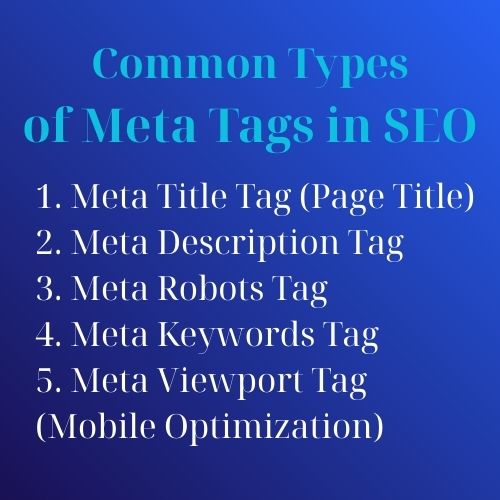
1. Title Tag
The title tag identifies the page and may be used as the clickable headline in search results.
<title>What Are Meta Tags? Complete SEO Optimization Guide</title>
Title Tag Best Practices
- Describe the page accurately.
- Make the title useful to the intended audience.
- Include the main topic naturally.
- Create a distinct title for each important indexable page.
- Use the brand name where it adds clarity.
- Avoid repeating keywords unnecessarily.
- Avoid generic titles such as “Home,” “Page 1,” or “Untitled.”
There is no universal character limit that guarantees a title will display completely. Search-result presentation depends on available width, characters, device, query, and the search engine’s formatting decisions.
Instead of writing to an exact character count, aim for a concise title that communicates the page’s main value before less important details.
2. Meta Description
The meta description summarizes the page.
<meta name="description" content="Learn what meta tags are, how they affect SEO, and how to write effective titles, descriptions and robots directives.">
Meta Description Best Practices
- Summarize the visible page content accurately.
- Match the user’s likely search intent.
- Explain the page’s main benefit or answer.
- Include relevant terminology naturally.
- Write a distinct description for important pages.
- Avoid vague or exaggerated claims.
- Avoid copying the same description across many pages.
A meta description is not a guaranteed search snippet. Search engines may select a passage from the visible page when it appears more relevant to a specific query.
There is also no fixed length that guarantees the entire description will be displayed. Write concise descriptions, but prioritize relevance and clarity over an exact character count.
3. Meta Robots Tag
The robots meta tag provides page-level instructions to supported search-engine crawlers.
<meta name="robots" content="noindex, follow">
Common Robots Directives
index: The page may be considered for indexing.noindex: The page should not appear in the search index.follow: Crawlers may follow links on the page.nofollow: Crawlers should not follow links on the page.noarchive: Requests that a cached copy not be shown where supported.nosnippet: Prevents a text or video preview where supported.max-snippet: Controls the maximum text-snippet length.max-image-preview: Controls permitted image-preview size.max-video-preview: Controls the maximum video-preview duration.
Example
<meta name="robots" content="index, follow, max-image-preview:large">
In many cases, index, follow does not need to be declared because it is the default behavior.
Important Noindex Warning
A search engine must be able to crawl the page to see a noindex directive.
If the URL is blocked in robots.txt, the crawler may not be able to read the meta robots tag. As a result, using both a crawl block and a page-level noindex directive can produce unexpected indexing behavior.
4. X-Robots-Tag HTTP Header
The X-Robots-Tag provides similar indexing directives through the HTTP response header.
It can be useful for non-HTML resources such as PDF documents.
X-Robots-Tag: noindex
Use either the page-level meta robots tag or the HTTP header according to the resource and technical setup.
5. Meta Viewport Tag
The viewport meta tag helps browsers render responsive layouts correctly.
<meta name="viewport" content="width=device-width, initial-scale=1">
Without a suitable viewport configuration, a responsive design may appear zoomed out or incorrectly scaled on mobile devices.
The viewport tag does not by itself create a mobile-friendly website. The CSS, layout, text size, buttons, forms, images, and navigation must also work correctly on small screens.
6. Character Encoding
The charset declaration tells the browser how to interpret the document’s characters.
<meta charset="utf-8">
It should appear early within the document head.
Although this element is not a ranking technique, correct encoding prevents display problems and contributes to a reliable page experience.
7. Meta Keywords Tag
The meta keywords tag is an outdated element that was historically used to list target keywords.
<meta name="keywords" content="meta tags, title tag, meta description">
It is not necessary for modern Google SEO and is generally best omitted.
Adding it creates no meaningful Google ranking benefit and may expose the site’s keyword targeting unnecessarily.
8. Canonical Link Element
The canonical element is not a meta tag, but it is an important head element frequently included in technical SEO audits.
<link rel="canonical" href="https://example.com/what-are-meta-tags/">
It indicates the preferred URL among duplicate or substantially similar versions.
A canonical tag is a hint rather than an absolute command. It should be supported by consistent internal links, sitemaps, redirects, and URL behavior.
9. Hreflang Link Elements
Hreflang annotations can help search engines understand language or regional variations of equivalent pages.
<link rel="alternate" hreflang="en" href="https://example.com/en/meta-tags/">
<link rel="alternate" hreflang="vi" href="https://example.com/vi/the-meta/">
<link rel="alternate" hreflang="x-default" href="https://example.com/meta-tags/">
Hreflang implementation should be reciprocal and consistent across alternate pages.
10. Open Graph Tags
Open Graph tags control how pages may appear when shared on platforms that support the protocol.
<meta property="og:title" content="What Are Meta Tags? Complete SEO Guide">
<meta property="og:description" content="Understand title tags, meta descriptions, robots directives, canonical URLs and social metadata.">
<meta property="og:image" content="https://example.com/images/meta-tags-guide.jpg">
<meta property="og:url" content="https://example.com/what-are-meta-tags/">
<meta property="og:type" content="article">
These tags do not directly control organic rankings, but a clear social preview may support sharing and referral traffic.
11. Twitter Card Tags
Twitter Card tags can define how a page appears when shared on X where supported.
<meta name="twitter:card" content="summary_large_image">
<meta name="twitter:title" content="What Are Meta Tags? Complete SEO Guide">
<meta name="twitter:description" content="Learn how important head elements affect search, indexing, mobile usability and social sharing.">
<meta name="twitter:image" content="https://example.com/images/meta-tags-guide.jpg">
12. Theme Color
The theme-color meta tag may influence browser interface appearance on supported devices.
<meta name="theme-color" content="#ffffff">
This is primarily a browser and branding feature rather than an SEO ranking element.
Meta Tags and Head Elements Reference Table
| Element | Main purpose | Direct ranking factor? |
|---|---|---|
<title> |
Defines the page title and may appear in search results | Important for SEO relevance and presentation |
| Meta description | Provides a candidate summary for search snippets | Not generally treated as a direct ranking factor |
| Meta robots | Controls indexing and supported preview behavior | Controls eligibility rather than improving rank |
| Meta viewport | Supports responsive rendering | Not a standalone ranking factor |
| Meta charset | Defines character encoding | No |
| Meta keywords | Historical keyword list | No meaningful Google SEO value |
| Canonical link | Identifies a preferred URL | Supports duplicate URL management |
| Hreflang | Identifies language and regional alternatives | Supports international targeting |
| Open Graph | Controls social-sharing previews | No direct organic ranking benefit |
| Twitter Card | Controls supported X sharing previews | No direct organic ranking benefit |
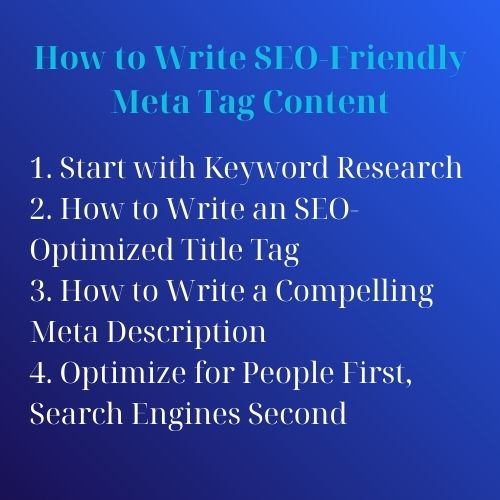
How to Write Effective Title Tags
Step 1: Identify the Page Purpose
Determine whether the page is:
- An informational guide
- A product page
- A product category
- A service page
- A location page
- A comparison
- A brand or company page
Step 2: Understand Search Intent
The title should match what the user expects.
Examples:
- Informational: What Are Meta Tags? Complete SEO Guide
- Commercial: SEO Audit Services for E-Commerce Websites
- Local: Website Design Company in Binh Duong
- Product: Waterproof Industrial LED Light – Specifications and Pricing
Step 3: Communicate the Main Value
Clarify what makes the page useful.
Examples of value may include:
- A complete guide
- Pricing information
- A comparison
- A checklist
- Technical specifications
- A local service area
Step 4: Use the Brand Name Appropriately
The brand name may be useful when:
- The brand has recognition.
- The page represents a commercial offering.
- The title remains clear and concise.
The brand does not need to appear in every title if it makes important page information difficult to understand.
Step 5: Avoid Excessive Boilerplate
Do not repeat long slogans or the same keyword string in every title.
Weak title:
Meta Tags SEO | Best Meta Tags SEO | Meta Tag Optimization Service
Improved title:
What Are Meta Tags? Complete SEO Optimization Guide
How to Write Effective Meta Descriptions
Step 1: Summarize the Visible Content
The description should accurately reflect what the user will find after clicking.
Step 2: Include a Specific Benefit
Explain what the reader can learn, compare, download, calculate, or accomplish.
Step 3: Use Natural Language
Avoid listing keywords separated by commas.
Weak description:
Meta tags, SEO meta tags, title tags, descriptions, ranking, Google SEO.
Improved description:
Learn how title tags, meta descriptions, robots directives, canonical URLs and social metadata support technical and on-page SEO.
Step 4: Use a Call to Action Only When Relevant
A call to action may help commercial pages, but not every description requires phrases such as “click now” or “start today.”
The description should first communicate relevance.
Step 5: Avoid Unsupported Promises
Do not claim that changing a meta description will automatically improve rankings, traffic, or revenue.
Title and Meta Description Examples
| Page type | Example title | Example description |
|---|---|---|
| Article | What Are Meta Tags? Complete SEO Guide | Learn which meta tags matter for SEO, how to write titles and descriptions, and how to control indexing and social previews. |
| Service | Technical SEO Audit Services | Viet SEO | Identify indexing, crawlability, performance, canonical and structured-data issues with a prioritized technical SEO audit. |
| Product category | Industrial Safety Shoes for Factories and Construction | Explore protective safety shoes for industrial, warehouse and construction environments, with specifications and ordering support. |
| Local page | SEO Services in Binh Duong | Viet SEO | SEO consulting and implementation for manufacturers, service providers and local businesses operating in Binh Duong. |
| Comparison | Yoast vs. Rank Math: Features and Differences | Compare Yoast and Rank Math by metadata controls, schema, sitemaps, redirects, usability and website requirements. |
Common Meta Tag Mistakes
1. Duplicate Title Tags
Duplicate titles make it harder for users and search engines to distinguish between pages.
Review whether the pages genuinely need to exist separately. Changing titles alone will not fix pages that target the same search intent.
2. Duplicate Meta Descriptions
Repeated descriptions reduce the usefulness of search snippets and often indicate templated or overlapping pages.
For large e-commerce sites, prioritize unique descriptions for commercially important categories and products rather than generating low-quality text simply to make every field different.
3. Missing Title Tags
Every indexable HTML page should have a meaningful title.
4. Missing Meta Descriptions
A missing description is not always a critical SEO error because search engines can generate snippets from page content.
However, manually written descriptions are often useful for important commercial and informational pages where a clear summary can improve presentation.
5. Keyword Stuffing
Repeating keywords can make titles and descriptions difficult to understand.
This may cause search engines to rewrite the title or choose another snippet. It can also reduce user trust.
6. Generic Titles
Examples include:
- Home
- Products
- Article
- Welcome
- New Page
Replace generic titles with information that distinguishes the page.
7. Writing Only to a Character Count
A title or description can fit within a recommended count and still be vague, repetitive, or irrelevant.
Use preview tools as guidance, but prioritize meaning and search intent.
8. Accidentally Using Noindex on Important Pages
A noindex directive on a homepage, service page, product category, or article can remove it from search results.
Audit noindex directives after:
- Website launches
- Website migrations
- Staging-to-production deployment
- CMS plugin changes
- Template updates
9. Blocking Noindex Pages in Robots.txt
If crawlers cannot access a URL, they may not be able to read its noindex directive.
Use the correct method according to whether you want to prevent crawling, indexing, or access by users.
10. Incorrect Canonical Tags
Common errors include:
- Canonicalizing all pages to the homepage
- Pointing to redirected URLs
- Using HTTP instead of the preferred HTTPS URL
- Referencing non-indexable pages
- Conflicting canonical and hreflang signals
11. Missing or Incorrect Social Images
A missing, inaccessible, or incorrectly sized Open Graph image may create poor social previews.
12. Depending on Meta Keywords
Adding a list of keywords does not replace visible content, proper page targeting, headings, internal links, or useful information.
How to Audit Meta Tags Across a Website
Step 1: Crawl the Website
Use an SEO crawler to collect:
- URLs
- Status codes
- Titles
- Meta descriptions
- Robots directives
- Canonical URLs
- H1 headings
- Hreflang annotations
Step 2: Separate Indexable and Non-Indexable Pages
Do not evaluate metadata for login pages, internal searches, filtered URLs, or other intentionally non-indexable resources in the same way as commercial pages.
Step 3: Identify Priority Pages
Prioritize:
- Homepage
- Main product categories
- Important product pages
- Core service pages
- Location pages
- High-traffic articles
- Pages receiving impressions but few clicks
Step 4: Review Duplicate and Template Problems
Look for patterns such as:
- Every title using the same text
- Descriptions generated from incomplete product data
- Category titles missing the category name
- Brand boilerplate overwhelming the main topic
Step 5: Compare With Search Console Data
Review pages with:
- High impressions and low click-through rate
- Unexpected queries
- Sudden visibility declines
- Multiple URLs appearing for similar searches
Do not change metadata based only on a low click-through rate. Ranking position, search-result features, brand recognition, query intent, and competition also affect clicks.
Step 6: Test Important Templates
Check whether CMS templates generate correct metadata for:
- Articles
- Products
- Categories
- Pagination
- Tag archives
- Location pages
- Multilingual versions
Step 7: Monitor After Updates
Track impressions, clicks, click-through rate, ranking position, engagement, and conversions after major changes.
Tools for Writing and Auditing Meta Tags
1. Google Search Console
Search Console helps identify how pages appear for queries and whether important URLs are indexed.
It does not provide a complete sitewide report of every title and description, so it is best combined with a crawler.
2. Screaming Frog SEO Spider
Screaming Frog can crawl a website and identify:
- Missing titles
- Duplicate titles
- Missing descriptions
- Duplicate descriptions
- Robots directives
- Canonical tags
- Header problems
Its available features and crawl limits may depend on the software version and licence.
3. Yoast SEO
Yoast provides WordPress fields and templates for managing:
- Titles
- Meta descriptions
- Robots settings
- Canonical URLs
- Social metadata
Plugin scores and previews are guides, not guarantees of search performance.
4. Rank Math
Rank Math provides similar metadata management features for WordPress, including template controls, robots directives, canonical fields, and social previews.
5. Browser Developer Tools
View the page source or inspect the document head to confirm what the website actually outputs.
This is important because CMS fields may appear correct while themes, plugins, JavaScript, or caching systems generate different HTML.
6. Search and Social Preview Tools
Preview tools can help estimate how titles, descriptions, and social images may appear.
Actual presentation can differ because platforms may rewrite text, crop images, or use cached information.
Meta Tag Publishing Checklist
| Element | Check before publishing |
|---|---|
| Title tag | Accurate, useful, distinct, and aligned with page intent |
| Meta description | Clear summary of visible content with no unsupported claims |
| Robots directive | Indexable pages do not contain accidental noindex directives |
| Canonical | Points to the correct preferred indexable URL |
| Viewport | Responsive viewport configuration is present |
| Charset | UTF-8 or the correct encoding is declared |
| Hreflang | Language alternatives are correct and reciprocal where applicable |
| Open Graph | Title, description, image and URL match the page |
| Twitter Card | Preview data is correct where used |
| Page content | Visible content supports the title and description |
Frequently Asked Questions
Do meta tags improve Google rankings?
Some head elements are important for SEO, but they work in different ways. The title helps communicate page relevance, robots directives control index eligibility, and canonical elements support duplicate URL management. A meta description is mainly used as a possible search snippet rather than a direct ranking signal.
Is the title tag a meta tag?
No. The title is a separate HTML element placed in the document head. It is commonly grouped with meta tags during SEO audits because it affects page identification and search-result presentation.
What is the ideal title tag length?
There is no universal character limit. Search engines display titles according to available width, device, query, and formatting decisions. Write a concise title that communicates the most important information clearly.
What is the ideal meta description length?
There is no guaranteed display length. Write a concise and accurate summary, understanding that search engines may shorten it or select a different passage from the page.
Does Google always use the meta description?
No. Google may use the submitted description or generate a different snippet from visible page content when that passage appears more relevant to the query.
Should I use the meta keywords tag?
It is generally unnecessary for modern Google SEO. Most websites can omit it without losing organic search performance.
Should every page have a meta description?
Important indexable pages usually benefit from a useful description. On very large websites, prioritize commercially important and high-visibility pages rather than generating low-quality descriptions merely to fill every field.
What is the difference between noindex and robots.txt?
A noindex directive asks search engines not to include a page in the index. A robots.txt rule controls crawling. Blocking crawling may prevent the search engine from seeing a page-level noindex directive.
Can meta tags fix poor content?
No. Metadata cannot compensate for content that is inaccurate, irrelevant, duplicated, or unable to satisfy the user’s search intent.
Conclusion
Meta tags and related head elements help browsers, search engines, and social platforms understand how a page should be processed and presented.
The most important areas include clear title tags, useful meta descriptions, correct robots directives, responsive viewport settings, accurate canonical URLs, and suitable social-sharing metadata.
However, metadata should not be treated as a shortcut to higher rankings. A strong title cannot rescue a page that is blocked from indexing, targets the wrong search intent, provides weak information, or offers a poor mobile experience.
The best approach is to coordinate metadata with visible page content, website structure, technical accessibility, internal linking, and conversion goals. Audit important templates regularly and use search-performance data to prioritize improvements.



Questions & Comments
You can ask a question about this article. Viet SEO will review and reply after moderation.