Heading Tags for SEO: H1–H6 Structure and Best Practices
Heading tags organize a page: H1 usually names the main subject, H2 introduces major sections and H3 divides those sections into smaller parts. Choose the level by the relationship between ideas, then use CSS to style it.
For a quick review, read only the headings. They should describe the page clearly without repeated keywords, empty sections or an unexplained jump in depth.
Go to heading levels, page examples or the audit steps.
What Is a Heading Tag?
HTML provides six heading elements, H1–H6. Their levels describe the depth of sections, rather than a required font size or a score for search optimization.
<h1>Guide to Choosing Office Desks</h1>
<h2>Choose the Right Size</h2>
<h3>Measure the Available Space</h3>
<h3>Allow Room for a Chair</h3>
<h2>Compare Materials</h2>
The two H3 headings belong to the size section. The next H2 starts a new major section.
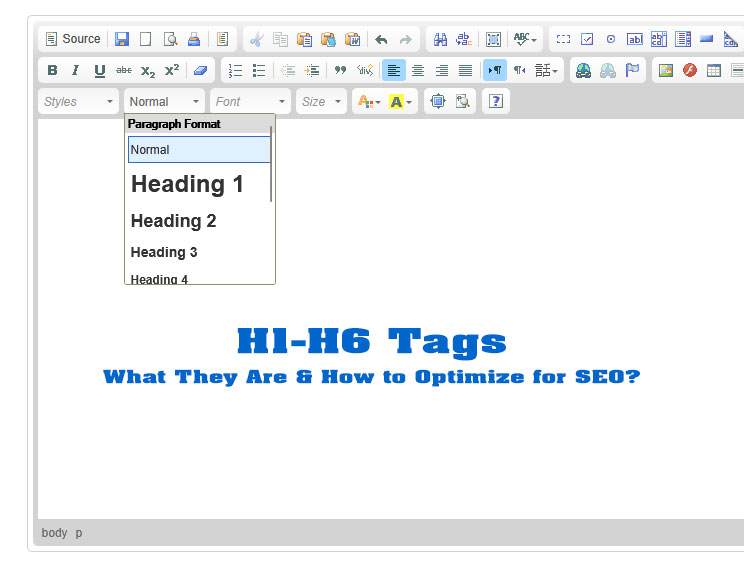
Heading Tags and Visual Styling Are Different
A large bold paragraph is not automatically an HTML heading. Likewise, a heading remains a heading when its font size changes.
.article h2 { font-size: 1.5rem; }
.article h3 { font-size: 1.25rem; }
This CSS only illustrates styling. Select the correct HTML level first and keep the visual hierarchy easy to recognize; do not choose H4 simply because its default size looks suitable.
Why Heading Tags Matter
1. They Improve Content Structure
Headings show where a section begins and how it relates to the rest of the page. Readers should be able to identify the main subject and find a relevant answer by scanning them.
2. They Support Scanning and Readability
Descriptive headings help people decide which part to read, especially in long guides, product comparisons and instructions. A short passage covering one idea does not need several headings.
3. They Support Accessibility
People using assistive technology may move directly between headings. Meaningful labels and a logical hierarchy make that navigation more useful.
4. They Provide Structural Context to Search Engines
Headings provide context about topics and sections. They do not replace accurate content, suitable page targeting, internal links or technical access.
5. They Can Support Anchor Navigation
Headings with unique IDs can be linked directly.
<h2 id="technical-seo">Technical SEO</h2>

<a href="#technical-seo">Jump to Technical SEO</a>
This can improve navigation in long articles and make it easier to share a link to a specific section.
Do Heading Tags Directly Improve Rankings?
Changing a paragraph to H2 or adding an exact keyword does not guarantee a ranking increase. Use headings to clarify the actual answer and its structure. A page can still underperform if the information is weak, the intent is wrong or the URL cannot be indexed.
How to Use the H1 Tag Correctly
What Is the Purpose of H1?
The H1 usually introduces the main page subject. Write a title that makes sense on its own, such as “Guide to Choosing Office Desks”, rather than “Welcome” or “New Article”.
Does Every Page Need an H1?
A clear visible main heading is a practical choice for articles, service pages, products and categories. Check whether the CMS already creates it from the page title before inserting another H1 in the body.
Can a Page Have More Than One H1?
For a standard page, one descriptive H1 keeps editing and navigation straightforward. Finding more than one is a reason to inspect the page, not proof of a Google penalty. Review whether the extra headings introduce useful regions or make the main subject unclear.
How to Use H2, H3, and Lower-Level Headings
Use H2 for Major Sections
H2 headings divide the page into its primary sections.
<h1>Beginner's Guide to SEO Content</h1>

<h2>Keyword Research</h2>

<h2>Search Intent</h2>

<h2>On-Page Optimization</h2>
Use H3 for Subsections of H2
<h2>Keyword Research</h2>

<h3>How to Find Seed Keywords</h3>

<h3>How to Evaluate Search Intent</h3>

<h3>How to Map Keywords to Pages</h3>
Use H4–H6 When Additional Depth Is Needed
Use deeper levels only when a subsection genuinely needs further subdivision. Many articles need no more than H1, H2 and H3; a detailed manual may need more. There is no requirement to use every level.
Should Heading Levels Be Skipped?
Avoid unnecessary jumps when opening a subsection. H2 followed by H3 expresses a parent-and-child relationship more clearly than H2 followed directly by H5.
<h2>Compare Materials</h2>
<h3>Wooden Desks</h3>
<h4>Surface Care</h4>
<h3>Metal Desks</h3>
<h2>Check Before Buying</h2>
The return from H4 to H3, then to H2, closes earlier subsections. It does not mean headings are missing.
How to Write Useful Headings
1. Describe the Section Clearly
Replace vague labels with the information readers will find. For example, “Measure the Available Space” is more useful than “Important Information” in a desk buying guide.
2. Match the Reader’s Search Intent
Name the question or task the section actually addresses. Keep the answer directly beneath it, with conditions and examples where needed.
3. Use Relevant Terms Naturally
Use the terminology needed to explain the section. “Common H1 Mistakes” is clear; “H1 SEO Best H1 Tag Optimization” repeats terms without adding meaning.
4. Keep Headings Specific
Keep headings short enough to scan and specific enough to distinguish sections. There is no universal character quota. Check wrapping and readability on the published mobile page.
5. Avoid Clickbait and Unsupported Claims
Make the promise match the section. Avoid claims about guaranteed rankings or search features that the content cannot support.
6. Use Questions When They Are Natural
A question works well when the section provides its answer. Other sections may be clearer as labels or instructions; they do not all need question marks.
7. Use Numbers Only When the Content Is a List
Use numbering when it communicates steps or an actual quantity. Match the number to the items and do not add extra sections merely to reach a promised total.
H1 Tag vs. Title Tag
The H1 and title tag serve related but different purposes.
| Element | Main purpose | Where it appears |
|---|---|---|
<title> |
Identifies the document and may appear as the search-result headline | HTML head, browser tab, and potentially search results |
<h1> |
Identifies the visible main topic of the page | Within the visible page content |
They may be similar, but they do not need to be identical.
For example:
<title>H1–H6 Heading Tags: Complete SEO and HTML Guide</title>

<h1>What Are Heading Tags and How Should You Use Them?</h1>
The title is optimized for the search result and browser context, while the H1 introduces the visible page naturally.
Do Headings Help With Featured Snippets?
Clear questions, definitions and instructions make content easier to use. However, Google decides whether to select a Featured Snippet. No heading formula, question mark or exact keyword guarantees that display.
Choose the format that best explains the answer: a paragraph for a definition, ordered steps for a procedure or a table for a comparison.
Heading Tags and Accessibility
Do Not Use Bold Text Instead of Headings
This visually resembles a heading but does not provide the same semantic structure:
<p><strong>Technical SEO</strong></p>
Use a real heading when the text introduces a section:
<h2>Technical SEO</h2>
Do Not Use Headings for Decoration
Large prices, telephone numbers, slogans and button labels do not automatically need heading markup. Decide whether the text introduces a section, then style it appropriately.
Avoid Empty Headings
<h2></h2>
Empty headings create confusing navigation for screen-reader users.
Keep Visible and Accessible Text Consistent
Use labels that convey the same section purpose to visual readers and assistive-technology users. Review accessible text if an icon, image or custom label is part of the heading.
Common Heading Tag Mistakes
1. Using Headings Only for Font Size
Select heading levels from the outline. Adjust size, spacing and weight with CSS instead of changing the level to obtain a visual effect.
2. Using Multiple Unrelated H1 Tags
Inspect the purpose of each H1 before changing it. A duplicated article title may belong to an editor setting, while repeated site-wide headings may need a template fix.
3. Missing a Clear Primary Heading
Give readers an obvious introduction to the page subject. Check the actual output rather than assuming the title field always generates H1.
4. Using Generic Headings
Labels such as “Overview” can work in context, but several identical “More Details” sections are difficult to scan. Add the subject when needed to distinguish them.
5. Keyword-Stuffed Headings
Use headings to identify sections. Repeating the main phrase in every heading adds little when the subject is already clear.
6. Skipping Levels Without a Structural Reason
Avoid opening a subsection several levels below its parent just because the default styling looks better. Returning to a higher level to start the next section is normal.
7. Using Heading Tags for Navigation Widgets
Sidebars and footer regions can legitimately have headings. Check their labels and levels in the full page structure rather than deleting them simply because they are outside the article.
8. Repeating the Page Title Throughout the Page
Repeated headings may be valid in some contexts, but copying the exact page title into every section makes the outline less informative. Name what each section adds.
9. Hiding Keyword-Focused Headings
Do not add hidden headings solely to target search phrases. Visually hidden labels can have legitimate accessibility purposes; evaluate their function rather than treating all hidden text alike.
10. Creating Headings With No Supporting Content
A heading needs a meaningful section, but there is no minimum paragraph count. Keep a short answer when it fully resolves a question; combine sections when their separation adds no value.
Heading Tags in Common Page Types
Blog Article
<h1>Complete Guide to Local SEO</h1>

<h2>What Is Local SEO?</h2>
<h2>How Local Search Works</h2>
<h2>How to Optimize a Google Business Profile</h2>
<h2>Common Local SEO Mistakes</h2>
Service Page
<h1>Technical SEO Audit Services</h1>

<h2>What the Audit Includes</h2>
<h2>Who Needs a Technical SEO Audit?</h2>
<h2>Our Audit Process</h2>
<h2>Request an Assessment</h2>
Product Page
<h1>Industrial Waterproof LED Light Model X100</h1>

<h2>Product Overview</h2>
<h2>Technical Specifications</h2>
<h2>Applications</h2>
<h2>Installation Instructions</h2>
Category Page
<h1>Industrial Safety Shoes</h1>

<h2>Shop by Protection Type</h2>
<h2>How to Choose Safety Shoes</h2>
<h2>Frequently Asked Questions</h2>
FAQ Page
<h1>SEO Service Frequently Asked Questions</h1>

<h2>How Long Does SEO Take?</h2>
<h2>How Much Does SEO Cost?</h2>
<h2>Can SEO Rankings Be Guaranteed?</h2>
How CMS Themes Affect Heading Tags
The editor may show only the article body. The published template can add the title, navigation, related articles and footer headings. Inspect the rendered page to see the complete structure, including content loaded through JavaScript.
How to Audit Heading Tags
Step 1: Inspect the Page Manually
Read only the headings. Can a new reader understand the main subject, locate an answer and see which ideas belong together?
Step 2: View the Rendered HTML
Inspect the loaded page in browser developer tools and identify the actual heading elements. Page source shows the initial HTML; the rendered DOM may include changes made by scripts.
Step 3: Check the Hierarchy
Check that major sections use consistent levels and that each subsection belongs to the section above it. Distinguish opening a deeper section from returning to a higher level.
Step 4: Check for Duplicate or Empty Headings
Remove accidental empty headings. Investigate repeated text in context: the same heading on separate pages is not automatically wrong when it labels the same type of section.
Step 5: Review Sitewide Patterns
Sample each affected template before making broad changes. An article problem may be fixed in one draft; the same issue on every product page may need a shared template change.
Step 6: Evaluate the Content, Not Only the Count
Record what is confusing, where it appears and how to verify the correction. A numerical warning is a starting point, not a complete accessibility or SEO assessment.
Tools to Check Heading Tags
1. Browser Developer Tools
Inspect H1–H6 elements on the published page. Check the full page, not only the content area shown in the editor.
2. Screaming Frog SEO Spider
A crawler can inventory selected heading information across URLs. Check the fields and configuration used; deeper levels may require extraction settings or manual review.
3. SEO Meta in 1 Click
A heading inspection extension can help with a quick page review. Confirm that its output includes the content rendered on the page you are testing.
4. Ahrefs Site Audit
Site audit software can flag selected heading patterns. Review the underlying page before treating a warning as a required change.
5. Accessibility Audit Tools
Accessibility tools can identify some structural issues. Combine their findings with a manual review of the outline and navigation; passing an automated check does not establish that the page is accessible.
Heading Tag Audit Checklist
| Check | What a useful result looks like |
|---|---|
| Main subject | A clear visible heading introduces the page |
| Section labels | Each heading describes the content that follows |
| Hierarchy | Subsections belong to their parent; peer sections use consistent levels |
| Meaning | No empty headings or keyword strings |
| Styling | CSS controls appearance without changing semantic levels |
| Template output | Article, navigation and related regions reviewed in context |
| Ownership | Content issues assigned to an editor; shared template issues to the website team |
| Verification | Published DOM, mobile wrapping and section links checked after the change |
Frequently Asked Questions
What are heading tags?
Heading tags are HTML elements from H1 to H6 that identify headings and subheadings. They organize content into a hierarchy that supports readability, accessibility, and page interpretation.
How many H1 tags should a page have?
Most standard webpages use one clear H1 to identify the primary topic. Multiple H1 tags are technically possible and do not automatically cause a penalty, but they should not make the page structure or main subject unclear.
Is the H1 tag a ranking factor?
The H1 provides useful structural and topical context, but adding a keyword to an H1 does not guarantee higher rankings. Search performance depends on the overall quality and relevance of the page.
What is the difference between an H1 and a title tag?
The H1 is the visible main heading within the page content. The title tag is located in the HTML head and may appear in the browser tab and search results.
Should every H2 contain a keyword?
No. Each H2 should describe its section clearly. Relevant terms may appear naturally, but repeating the primary keyword in every heading is unnecessary.
Is skipping heading levels bad for SEO?
Skipping a level when opening a subsection can make navigation confusing. Returning from H4 to H2 to begin a new major section is normal. Review the structure for clarity rather than assuming every change in level is an SEO penalty.
Can headings help earn featured snippets?
Clear question headings and well-formatted answers may make content easier to interpret, but no heading structure guarantees a featured snippet.
Should heading tags be used for styling?
No. Heading tags should represent content structure. Use CSS to control font size, spacing, weight, and appearance.
Conclusion
Build an outline that readers can follow: a clear main subject, meaningful major sections and subsections only where needed. Then check what the CMS actually publishes.
Heading review belongs within SEO content writing, alongside accurate information, helpful links and a usable page.
Further reading: W3C WAI heading guidance, Google title-link guidance and Featured Snippet documentation.




Questions & Comments
You can ask a question about this article. Viet SEO will review and reply after moderation.