PIM Workflow for E-commerce: Data Standards, Integration and QA
What Is PIM and Why Does It Matter for E-commerce?
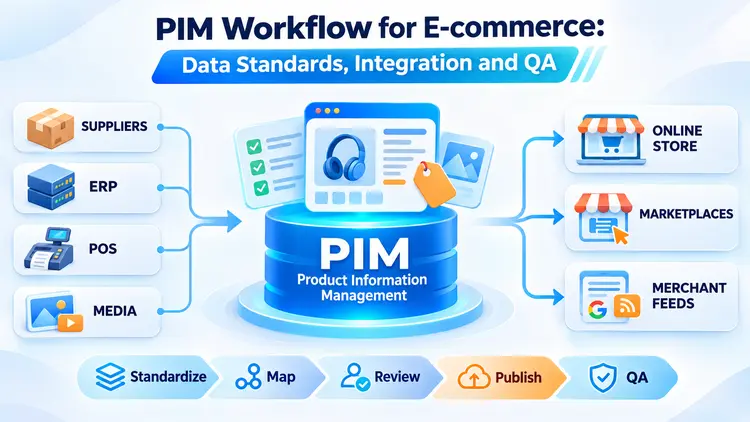
Product Information Management (PIM) is the process and software used to collect, organize, enrich, approve and distribute product information across sales and marketing channels. Rather than editing the same product description separately in a website, spreadsheet and marketplace account, a business maintains governed product records and distributes channel-ready data from a central workflow.
PIM is especially useful when a store has many SKUs, frequent price or assortment changes, product variants, multiple suppliers, or multilingual catalogs. It helps teams reduce duplicate work and prevent inconsistent specifications, although it does not replace an ERP, inventory management system or the commercial platform itself.
This guide explains a practical PIM workflow for e-commerce, from source-system ownership and data standards to website integration, Google Merchant Center feeds and pre-launch quality assurance (QA).
1. Identify Source Systems and Data Owners
Begin by identifying where each piece of product information originates. An ERP may be authoritative for product codes, a warehouse system for stock, a pricing service for current prices, and a digital asset management (DAM) library for approved images. PIM should make these responsibilities explicit rather than treating every incoming value as equally reliable.
- Supplier catalogs: manufacturer descriptions, technical specifications, identifiers and certifications.
- ERP, POS and inventory systems: internal SKUs, stock, pricing inputs and operational product states.
- DAM and creative teams: approved product photography, diagrams, videos and usage rights.
- Merchandising and content teams: product naming, selling points, localization, category assignments and editorial approvals.
- Third-party datasets: supplemental attributes that may require verification before publication.
For each field, document its source of truth, data owner, update frequency and fallback policy. For example, a content editor may improve product descriptions but should not overwrite inventory quantities maintained by a stock-management system.
2. Design a Product Data Model That Scales
A reliable PIM model needs stable identifiers and clear rules for product families, individual variants and channel-specific content. The exact fields vary by industry, but most e-commerce catalogs need the following groups:
- Identification: internal SKU, product family or group ID, brand, and valid GTIN or MPN when available.
- Editorial content: product title, short and long descriptions, benefits, usage instructions and language-specific copy.
- Technical attributes: size, color, materials, dimensions, weight, compatibility and category-specific specifications.
- Commerce: price, currency, sale price when applicable, stock status, fulfillment lead time and shipping information.
- Digital assets: primary and secondary images, alternative text, videos and variant-to-image relationships.
- Governance: source, last-updated date, approval status, publication channel and change history.
Do not invent GTINs or reuse identifiers across unrelated products. A parent product may group several color or size variants, while each sellable variant should have its own stable SKU and accurate attributes.
3. Standardize Data Before Synchronization
Normalization turns inconsistent inputs into predictable, reusable product records. Without it, one supplier might use “navy blue,” another “dark blue,” and a third “navy” for the same filter value.
- Standardize units: convert measurements into agreed units such as cm, kg and currency formats appropriate to the target market.
- Normalize attributes: define consistent field names and controlled values for color, size, material and other filters.
- Map categories: align PIM categories with website taxonomy and the relevant marketplace or Google product categories.
- Validate completeness: require critical attributes before a product is approved for a given channel.
- Track changes: log updates and support recovery when an import or mapping rule introduces bad data.
Validation should be category-aware. For example, a laptop may require processor and RAM details, while a clothing item may require material and size. One universal template is rarely sufficient.
4. Map PIM Fields to Product Structured Data and Merchant Feeds
Website structured data and product feeds are different outputs. Both may come from the same PIM record, but they require their own mapping rules, supported formats and validation.
| PIM field | Website / Schema.org | Merchant Center feed |
|---|---|---|
| Product title | Product.name |
title |
| Description | Product.description |
description |
| Primary image URL | Product.image |
image_link |
| SKU / identifiers | Product.sku, valid GTIN or MPN |
id, gtin, mpn where applicable |
| Price and currency | Offer.price, Offer.priceCurrency |
price, sale_price if applicable |
| Availability | Offer.availability |
availability |
| Product variants | ProductGroup and related Product entries where appropriate |
Variant records and item_group_id where applicable |
Important: this is a conceptual mapping, not a complete feed specification. Required and conditional Merchant Center attributes depend on product type, destination and target country. Feed values such as in_stock are not identical to Schema.org values such as https://schema.org/InStock; conversion logic must handle each output correctly.
The product page, structured data, feed and checkout must represent consistent offers, especially for price and availability. Test the actual landing pages, not just the exported data file.
Handle Variant URLs and ProductGroup Carefully
Products with colors, sizes or materials may need variant-specific URLs, prices, images or availability. Google's ProductGroup documentation describes single-page and multi-page implementations; canonical URL decisions depend on the site's variant architecture, not on a universal rule to point every variant to the parent page.
Where supported, use stable variant identifiers, clear selectors and appropriate ProductGroup relationships. Ensure that each directly accessible variant URL shows the correct selected variant and its associated product information.
5. Establish an Editorial, Approval and Publishing Workflow
A controlled workflow prevents partially completed or unreviewed products from reaching customers.
- Ingest: import supplier CSV files or receive source-system records through an API.
- Normalize: convert units, standardize terms, detect duplicates and validate identifiers.
- Enrich: add useful product descriptions, specifications, images and localized content.
- Review: have the relevant product, compliance or SEO owners confirm accuracy and channel readiness.
- Publish: synchronize approved records to the storefront and destination-specific feeds.
- Monitor: collect synchronization errors and send affected SKUs back for correction.
Useful record states include draft, in_review, approved, published and discontinued. Define who can change a state and what happens when an approved product receives new unverified data.
6. Manage Product Images and Other Digital Assets
Consistent imagery helps people identify the correct item across product pages and shopping channels. Store original assets and usage rights centrally, then generate suitable image versions for websites, mobile devices and feed destinations.
- Connect images to the correct product and variant; do not show the blue model when the red variant is selected.
- Use descriptive file names and meaningful alternative text on the website where appropriate.
- Preserve image dimensions and generate responsive sizes without distorting the product.
- Maintain version history and cache-invalidation rules when replacing product photographs.
- Check every destination's image specifications separately before publishing.
7. Integrate PIM with WooCommerce, Shopify or a Headless Store
WooCommerce
Use a supported connector, scheduled import or custom API integration to map the PIM SKU to WooCommerce products and variations. Decide which system owns descriptions, categories, images, prices and stock. Test the integration against a staging store before enabling scheduled synchronization.
Shopify
Connect through current Shopify Admin APIs or a maintained integration. Map standard product fields, variants and metafields deliberately, and document rate limits, error handling and update ownership. Avoid letting several applications overwrite the same attribute without a clear priority rule.
Headless Commerce
A headless storefront can consume PIM data through middleware or APIs while generating product pages and structured data through server-side rendering or another search-accessible rendering strategy. Ensure the HTML and visible content remain consistent, especially when prices and stock change frequently.
8. Pre-launch QA Checklist for PIM
Before launch, test a representative sample of product types, variants, languages and edge cases rather than checking only a few standard products.
- Catalog coverage: compare product and variant counts between PIM and the storefront; explain any intentional exclusions.
- Data accuracy: verify SKU, brand, specifications, prices, currency, stock and shipping details.
- Structured data: test representative pages and check that markup matches visible product content.
- Merchant Center: inspect feed processing, diagnostics and affected product IDs.
- Variants: test selectors, deep links, canonical behavior, images and the correct offer for each variant.
- Media: validate image URLs, formats, mobile rendering, dimensions and load performance.
- Workflow: verify approval permissions, failed imports, retry behavior and rollback capability.
- Localization: check translations, language-specific descriptions, units and market-specific pricing.
Use Google's Rich Results Test and product variant documentation when evaluating eligible product markup. For feed requirements, consult the Merchant Center product data specification. These external resources may change as Google updates its requirements.
9. Monitor Data Quality After Launch
PIM is an ongoing operation, not a one-time migration. Track feed disapprovals, missing attributes, synchronization failures, stale records and discrepancies between source systems and published channels. Assign owners and response times to recurring issues.
Useful operational measures include the percentage of approved products with complete required fields, synchronization success rates, the age of last updates, and the number of unresolved feed or offer mismatches. Keep a tested rollback procedure for major data failures.
Frequently Asked Questions About PIM
Is PIM the Same as ERP?
No. ERP typically supports business operations such as purchasing, accounting and inventory management, while PIM focuses on the quality, enrichment and distribution of product information. The two systems usually exchange data.
Does PIM Directly Improve Google Rankings?
No. PIM is not a direct ranking factor. It can support SEO indirectly by making product descriptions more reliable, maintaining consistent attributes, improving product-page quality and reducing feed or structured-data discrepancies.
Does Every Online Store Need Dedicated PIM Software?
Not necessarily. A small store with a limited, stable catalog may manage its information effectively inside its commerce platform. Dedicated PIM becomes more valuable as the number of products, variations, markets and publishing channels grows.
Can PIM Help with AI Search and GEO?
Well-maintained product information can make online content clearer and more consistent across channels that search and AI systems may use. However, PIM alone does not guarantee inclusion, citations or visibility in AI-generated answers.
Conclusion
A successful PIM workflow for e-commerce starts with trustworthy source data and clear ownership. Standardized attributes, channel-specific mappings, editorial approval and thorough QA help businesses publish accurate product information across their websites, marketplaces and shopping feeds.
For stores expanding their catalogs or sales channels, treat PIM as a shared operational process between merchandising, content, development and SEO teams. The objective is not simply to move data faster, but to publish the right product information in the right format wherever customers encounter it.




Questions & Comments
You can ask a question about this article. Viet SEO will review and reply after moderation.