+84917212969

Affordable Website Design: Cut Costs Without Sacrificing Quality

Written by Viet SEO Team Posted date: Updated: 1.463
Affordable website design is a practical need for many startups, small businesses, and individual online entrepreneurs. But how can you save costs while ensuring your website remains professional, SEO-friendly, fast, and scalable? In this article, we will share effective ways to reduce website design costs, common pitfalls to avoid, and the latest trends to help you build a beautiful, high-quality website without overspending.

A professional website can help a business introduce its brand, reach potential customers, generate inquiries, sell products, and build long-term credibility.

However, not every company needs a large custom platform from the beginning. Startups, small businesses, individual entrepreneurs, and companies testing a new idea may need a website that is professional and reliable but still appropriate for a limited budget.

This is the purpose of affordable website design: creating a website with the right scope, essential functions, and a stable technical foundation without spending money on unnecessary complexity.

Affordable does not mean outdated, insecure, difficult to use, or impossible to expand. It means making informed decisions about what the website needs now and what can be developed later.

In this guide, you will learn:

  • What affordable website design really means
  • Which factors influence website costs
  • How to reduce costs without sacrificing essential quality
  • Which items should never be removed just to save money
  • Common mistakes that increase long-term costs
  • How to work efficiently with a website design provider
  • When a business should invest in a more advanced website

What does affordable website design mean?

Affordable website design is a development approach that matches the website scope to the business’s current objectives, budget, and stage of growth.

An affordable website may use:

  • A reliable content management system
  • A professionally developed template
  • A limited number of custom page layouts
  • Standard functions instead of unnecessary custom programming
  • A phased development plan
  • Existing integrations where appropriate

The goal is not to remove every cost. It is to invest in the elements that directly support usability, credibility, marketing, and business operations.

An affordable website should still include:

  • A clean and professional interface
  • Responsive mobile design
  • Clear navigation
  • Readable and useful content
  • Secure administrator access
  • Reliable contact or conversion functions
  • Basic technical SEO controls
  • Appropriate hosting and backups
  • Clear ownership and support terms

Affordable should not mean:

  • Using unlicensed templates or plugins
  • Launching without mobile testing
  • Ignoring security and backups
  • Using copied or incomplete content
  • Removing all technical SEO controls
  • Leaving ownership terms unclear
  • Choosing a platform that cannot support foreseeable growth
  • Receiving no training or administration access

Affordable website design is therefore about balancing cost, quality, and future needs rather than choosing the lowest quotation.

Who should consider affordable website design?

Startups

A startup may need a focused website to:

  • Present a new product or service
  • Collect early customer feedback
  • Generate leads
  • Validate demand
  • Support a fundraising or partnership discussion

An initial website can be developed as an MVP and expanded after the business learns more about customer behavior.

Small and medium-sized businesses

A small business may only need to introduce its services, publish contact information, show completed projects, and receive customer inquiries.

There may be no immediate need for complex customer accounts, automated workflows, or software integrations.

Freelancers and independent professionals

Consultants, designers, photographers, developers, architects, coaches, and other professionals can use an affordable website to present:

  • Experience
  • Services
  • Portfolio
  • Testimonials
  • Working process
  • Contact information

Small online shops

A basic online store may begin with:

  • Product categories
  • Product detail pages
  • Shopping cart
  • Order form
  • Basic payment options
  • Simple order management

Advanced inventory, loyalty, warehouse, and CRM functions can be added when the sales volume justifies the investment.

Businesses testing a new idea

A landing page or focused website can support:

  • A new product launch
  • A temporary campaign
  • A new geographic market
  • A new service category
  • Customer registration
  • Advertising experiments

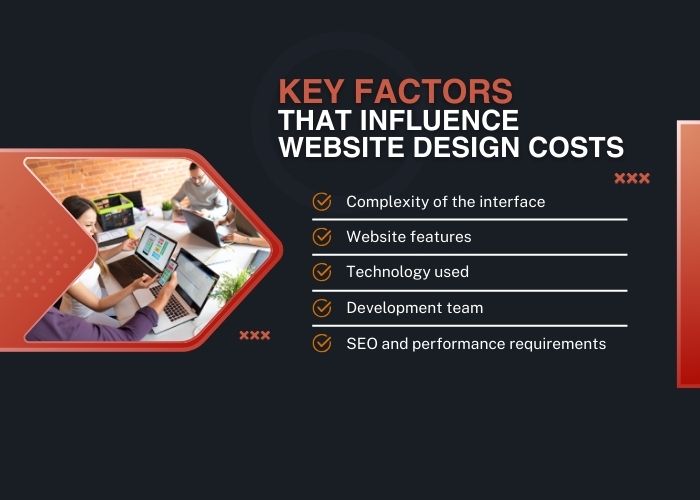
Key factors that influence website design costs

To reduce costs intelligently, businesses should first understand which parts of a website project require the most time and resources.

Key factors that influence affordable website design costs

1. Website type

Common website types include:

  • Landing page
  • Company introduction website
  • Portfolio website
  • Service website
  • Content or news website
  • Product catalog
  • E-commerce website
  • Booking platform
  • Membership website
  • Custom web application

A simple company website normally requires less work than a website with customer accounts, payments, inventory, booking rules, or internal workflows.

2. Interface complexity

Design costs are influenced by:

  • Template or custom design
  • Number of unique page layouts
  • Brand requirements
  • Responsive versions
  • Animations and interactions
  • Wireframes and prototypes
  • Number of revision rounds

A clean interface may cost less than a highly customized visual experience, but simplicity still requires thoughtful typography, spacing, content hierarchy, and mobile adaptation.

3. Website functions

Functions that commonly increase cost include:

  • Online ordering
  • Payment gateways
  • Booking or reservations
  • User registration and login
  • Membership subscriptions
  • Advanced product filtering
  • Multilingual content
  • CRM or ERP integration
  • Email and SMS automation
  • Custom reports

Each function should be evaluated according to whether it is essential for launch, useful later, or unnecessary.

4. Technology and platform

Common platform options include:

  • WordPress
  • WooCommerce
  • Shopify
  • Static HTML
  • Laravel and other back-end frameworks
  • React, Vue, and other front-end frameworks
  • Headless content management systems
  • Custom content management systems

A content management system may reduce development time for standard requirements. A custom platform may be appropriate when the website has specialized workflows or integrations.

The platform name alone does not determine whether the website is affordable or expensive. The actual scope, customization, maintenance, licenses, and infrastructure determine the total cost.

5. Content and data

Website content can represent a significant part of the project.

Related work may include:

  • Copywriting
  • Product descriptions
  • SEO articles
  • Photography
  • Image editing
  • Translation
  • Product entry
  • Content migration
  • URL redirects

Providing well-organized content early can reduce delays and additional production costs.

6. SEO requirements

A basic technical SEO foundation may include:

  • Editable title tags and meta descriptions
  • Search-friendly URLs
  • Logical heading structure
  • XML sitemap
  • Robots.txt
  • Canonical URLs
  • Image alternative text
  • Structured data where appropriate
  • Google Search Console configuration

Ongoing keyword research, content production, authority building, and ranking improvement are usually separate services.

7. Performance and security

Website performance and security may involve:

  • Image optimization
  • Caching
  • Code optimization
  • Hosting configuration
  • SSL
  • Administrator security
  • Backups
  • Malware monitoring
  • Software updates

Performance targets should be realistic and defined according to the actual pages, content, devices, and third-party scripts used.

8. Development team

Businesses may work with freelancers, small teams, specialized agencies, or software companies.

The provider type does not automatically determine quality, price, or reliability.

Important factors include:

  • Relevant experience
  • Technical capability
  • Communication
  • Testing process
  • Documentation
  • Warranty
  • Post-launch support

How to reduce website design costs without sacrificing quality

1. Define one primary objective

Decide what the website should mainly help users do:

  • Understand the business
  • Request a quotation
  • Book a consultation
  • Purchase a product
  • View a portfolio
  • Register for a service

A clear objective makes it easier to remove functions that do not support the intended user journey.

2. Use an MVP approach

A Minimum Viable Product website includes the essential pages and functions required to launch, measure results, and learn from real users.

An MVP approach can help businesses:

  • Launch earlier
  • Reduce initial investment
  • Collect customer feedback
  • Validate assumptions
  • Prioritize future improvements

MVP should not mean ignoring security, mobile usability, ownership, or technical quality.

3. Separate essential and future functions

Divide requirements into three groups:

  • Essential for launch
  • Useful but not urgent
  • Future development

This creates a clearer budget and development roadmap.

4. Use a reliable template when appropriate

A professional template can reduce interface design and development time for standard website requirements.

This may be suitable for:

  • Small business websites
  • Portfolio websites
  • Blogs
  • Landing pages
  • Basic online stores

Before selecting a template, check:

  • License terms
  • Mobile responsiveness
  • Performance
  • Accessibility
  • Update history
  • Compatibility
  • Customization limits

5. Choose a suitable content management system

A suitable CMS can reduce the amount of custom development and allow business staff to manage content.

The right platform depends on:

  • Website type
  • Required functions
  • Security needs
  • Future scalability
  • Maintenance resources
  • Available budget

6. Prepare content before development

Before the design stage, prepare:

  • Company information
  • Service descriptions
  • Product data
  • Images
  • Testimonials
  • Contact details
  • Policies
  • Brand guidelines

Early content preparation reduces design revisions and project delays.

7. Reuse reliable components

Standard functions such as forms, maps, galleries, basic product catalogs, and selected payment integrations may be implemented using reliable existing components.

Custom development should be reserved for functions that create clear business value or cannot be handled properly by standard tools.

8. Avoid unnecessary visual effects

Complex animations and visual effects may increase design, development, testing, and performance optimization costs.

Use interactions only when they improve understanding or usability.

9. Choose appropriate hosting

Free or extremely limited hosting may create problems with speed, uptime, security, support, and backups.

However, a small business website does not necessarily need an expensive server.

Hosting should be selected according to:

  • Expected traffic
  • Storage
  • Website technology
  • Email requirements
  • Security
  • Backup needs
  • Technical support

10. Plan for long-term maintenance

Clarify maintenance requirements before launch, including:

  • Software updates
  • Backups
  • Security monitoring
  • Technical support
  • Content changes
  • License renewals

A clear maintenance plan can prevent unexpected operating expenses.

What should you keep, delay, or avoid?

Priority Items
Keep from the beginning Mobile design, clear content, secure access, forms, ownership rights, backups, basic SEO controls
Consider delaying Advanced automation, complex animations, membership functions, CRM integration, multiple languages
Avoid completely Unlicensed software, unclear ownership, insecure hosting, copied content, unnecessary features

Reference affordable website design costs

The following ranges are general references rather than fixed quotations.

Website type Typical scope Reference investment range
Landing page One focused page, contact form, responsive layout, basic tracking Approximately VND 3–8 million
Portfolio website Profile, services, project gallery, contact form Approximately VND 5–15 million
Small business website Company introduction, services, blog, contact form, basic technical SEO Approximately VND 5–20 million
Basic product catalog Product categories, product pages, inquiry form Approximately VND 8–25 million
Basic e-commerce website Products, cart, order form, selected payment methods, order management Approximately VND 10–30 million

The final cost may increase when the project requires custom design, large content migration, online payment, customer accounts, multiple languages, advanced booking, or third-party integrations.

Additional and recurring costs

The initial website quotation may not include every expense required to operate the website.

Businesses should ask about:

  • Domain registration and renewal
  • Hosting or server
  • SSL
  • Business email
  • Paid templates and plugins
  • Stock images and fonts
  • Content writing
  • Maintenance
  • Backups
  • Security monitoring
  • Third-party applications
  • Future upgrades

Costly mistakes to avoid in affordable website design

1. Choosing only by the lowest price

A low quotation may be suitable when the scope is limited and clearly defined. It becomes risky when important items are omitted or ownership and support terms are unclear.

Instead of judging by price alone, compare:

  • Pages and functions
  • Design method
  • Mobile development
  • SEO configuration
  • Content entry
  • Hosting
  • Warranty
  • Maintenance

2. Building without future planning

A business does not need to pay for every future function immediately. However, the provider should understand the likely development direction.

This helps avoid selecting a platform that cannot support foreseeable upgrades.

3. Ignoring website ownership

The contract should clearly identify who owns and controls:

  • Domain name
  • Hosting account
  • Administrator account
  • Source code
  • Database
  • Analytics accounts
  • Third-party licenses

4. Using unlicensed software

Unauthorized themes and plugins may create security, compatibility, update, and legal risks.

5. Skipping a clear contract

A website contract should specify:

  • Project scope
  • Deliverables
  • Excluded items
  • Timeline
  • Payment milestones
  • Revision limits
  • Ownership
  • Warranty
  • Maintenance
  • Additional-work rates

6. Adding too many features

More functions can increase both initial development and long-term maintenance costs.

Add a function only when it supports a specific business or user requirement.

1. MVP and phased development

Businesses increasingly launch essential functions first and use real customer data to determine future investment.

2. Content-first design

The interface is planned around clear messages, customer questions, trust information, and calls to action instead of unnecessary decorative elements.

3. Mobile-first design

Affordable websites increasingly prioritize mobile navigation, readable content, short forms, optimized images, and accessible contact actions.

4. Selective use of AI

AI tools may assist with drafting, research, image concepts, testing support, or customer service.

AI does not remove the need for professional review, brand consistency, accurate content, privacy controls, or technical implementation.

5. Modern static and headless approaches

Static site generators and headless systems may be suitable for selected projects that need strong performance, structured content delivery, or multiple front ends.

They are not automatically cheaper or easier to manage. The decision should consider editing requirements, hosting, integrations, developer availability, and maintenance.

6. Landing pages for idea validation

A landing page can help a business test messaging, offers, and customer demand before investing in a larger website.

7. Managed website services

Some providers combine website development with hosting, maintenance, backups, and support under a recurring service plan.

Businesses should carefully review ownership, cancellation, data export, and transfer conditions.

Tips for working with website design agencies to save costs

How to work with website design agencies and control costs

1. Prepare a clear brief

The brief should describe:

  • Business objectives
  • Target customers
  • Required pages
  • Essential functions
  • Reference websites
  • Available content
  • Budget range
  • Expected launch date

2. Prepare content early

Providing text, images, product data, and brand materials on time reduces delays and repeated design changes.

3. Assign one approval contact

A clear decision-maker helps prevent conflicting feedback and repeated revision cycles.

4. Follow the agreed timeline

Late feedback and delayed content may extend the project and create additional work.

5. Control scope changes

New requests should be documented, estimated, and approved before implementation.

6. Compare packages carefully

An all-inclusive package may simplify budgeting, but businesses should still confirm:

  • What is included
  • What is excluded
  • Content-entry limits
  • Revision limits
  • License fees
  • Renewal costs
  • Warranty and support

When should you invest in a more advanced website?

A larger investment may be appropriate when:

  • The website has become a major sales channel.
  • The business needs a distinctive brand experience.
  • Customer journeys have become more complex.
  • The project requires CRM, ERP, POS, or warehouse integration.
  • The website needs customer accounts or subscriptions.
  • The website handles large product catalogs or high traffic.
  • There are strict security or compliance requirements.
  • The website is the core digital product of the business.

Businesses should upgrade based on actual operational needs and user data rather than adding complexity simply to appear more advanced.

Affordable website design checklist

  • What is the website’s primary objective?
  • Which pages are essential for launch?
  • Which functions are truly necessary?
  • Can any functions be developed later?
  • Will the design use a template or custom layouts?
  • Who prepares and enters the content?
  • What technical SEO work is included?
  • What mobile and browser testing is included?
  • Who owns the domain, hosting, source code, and database?
  • Are templates and plugins properly licensed?
  • What are the annual renewal costs?
  • How long is the warranty?
  • What maintenance is required?
  • Can the website be transferred to another provider?
  • Can the website be expanded later?

Frequently asked questions about affordable website design

Is an affordable website always low quality?

No. A website may be affordable because it uses a controlled scope, a reliable template, standard functions, and phased development. Quality depends on design, implementation, hosting, security, content, and support.

How much does an affordable website cost?

A small business website may cost approximately VND 5–20 million, depending on page templates, design, content, functions, technical SEO, and support.

Can an affordable website rank on Google?

Yes. It can rank when it provides useful content, matches search intent, has an appropriate technical structure, and receives ongoing SEO work.

Should I use a website template?

A template may be suitable for a standard business, portfolio, content, or basic e-commerce website. It should be properly licensed, maintained, responsive, and adaptable to the brand.

Is WordPress always the cheapest option?

No. WordPress can reduce development time for many standard projects, but extensive customization, paid plugins, hosting, security, and maintenance can increase the total cost.

Can an affordable website be expanded later?

Often yes. The level of expansion depends on the selected platform, source code quality, database structure, and original planning.

Does the price include domain and hosting?

Not always. Domain, hosting, SSL, email, licenses, maintenance, and content may be included or quoted separately.

Should I choose a freelancer or an agency?

Choose based on relevant experience, communication, process, technical capability, testing, documentation, and support rather than provider type alone.

Conclusion

Affordable website design is not about building the cheapest possible website. It is about investing in the right scope and protecting the elements that directly affect quality and long-term value.

A cost-effective website should still be:

  • Professional
  • Responsive
  • Easy to navigate
  • Secure
  • Manageable
  • SEO-ready
  • Appropriate for future development

The most effective ways to control costs are to define clear objectives, launch only essential functions, prepare content early, use reliable existing components, control scope changes, and budget for ongoing maintenance.

Your website should be treated as a long-term digital asset, but the initial investment should still match the current stage of your business.

If you need a professional and affordable website, contact Viet SEO for a detailed consultation. Our team will help you define the essential scope, select a suitable platform, and prepare a transparent quotation based on your current objectives and budget.

Expert Q&A

Questions & Comments

You can ask a question about this article. Viet SEO will review and reply after moderation.

No questions yet. Be the first to ask.

Your question will be reviewed before being published.

CAPTCHA
Related posts
Chat Zalo VietSEO