Server-side GA4 Tracking: AI Referrals and Consent
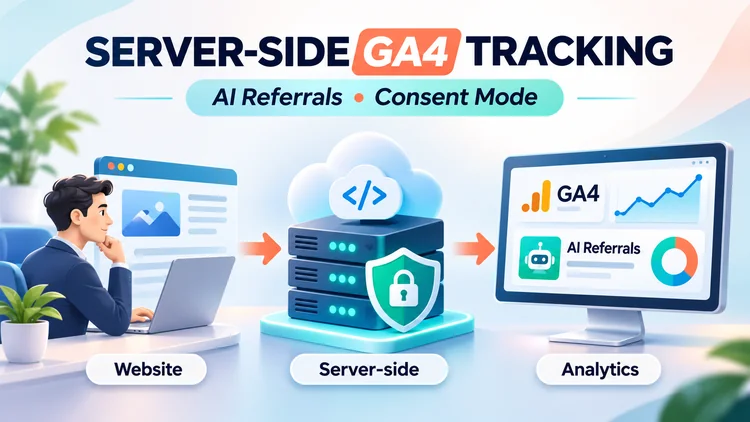
Server-side tracking for Google Analytics 4 (GA4) routes measurement requests through a server endpoint that your organization manages. It can improve control over event validation, routing and data minimization, but it does not eliminate browser collection, guarantee more conversions or override a visitor’s consent choices. This guide explains a practical setup and how to report identifiable traffic from AI assistants separately from AI citations that do not generate a visit.
What is server-side GA4 tracking?
In a typical setup, the website sends a measurement request to a first-party tagging endpoint. A server-side Google Tag Manager (sGTM) container receives and processes it before an authorized tag forwards data to GA4. Browser-side code still captures page views, form interactions and other user actions; the server layer manages what happens to those requests next.
- More control: validate event names and parameters, reduce unnecessary fields and route approved data to defined destinations.
- Cleaner governance: separate development and production deployments, record configuration changes and restrict who can modify tags.
- Real operating costs: a tagging server requires hosting, monitoring, security maintenance and consent-aware configuration.
For a small website with straightforward analytics needs, a well-configured client-side GA4 implementation may be sufficient. Choose server-side tagging when its added control justifies the complexity.
Choose an architecture and implement the data flow
| Option | Best suited to | Considerations |
|---|---|---|
| Server-side GTM | Teams already using GTM and GA4 | Manage a server container, tagging domain, clients and tags |
| Custom Cloud Run service | Complex validation or multiple destinations | More engineering, security testing and long-term maintenance |
| Reverse proxy | Organizations with existing infrastructure | Proxying alone does not provide consent enforcement or GA4 event logic |
- Audit existing tracking: list web tags, conversion events, consent settings and data destinations. Take a baseline before changing anything.
- Deploy a server container: create a separate testing environment and configure a first-party endpoint such as
metrics.example.com. - Route GA4 traffic: set the web Google tag to send requests through the approved endpoint, and configure the corresponding GA4 client and tag in sGTM.
- Validate: preview both web and server containers; verify request handling, destination, response codes and unexpected duplicate hits.
- Release gradually: test a small traffic segment and monitor data quality before expanding.
A first-party endpoint alone does not authorize data collection or guarantee that browser restrictions will be bypassed.
Respect consent with a CMP and Google Consent Mode
A consent management platform (CMP) should present the relevant choices, apply the correct default state and communicate updates to Google tags. Google Consent Mode can change how consent-aware tags behave, but it is not a substitute for a valid consent process or your legal obligations.
- Basic implementation: configure Google tags to remain blocked until the relevant consent is granted.
- Advanced implementation: consent-aware Google tags may send limited cookieless signals while consent is denied, where legally appropriate and correctly configured; this is not permission to send personally identifiable information.
- Server enforcement: check applicable consent state and destination policy before forwarding requests or including identifiers. Do not assume a custom
consent=truefield is a complete implementation of Consent Mode.
Test at least three scenarios: before a visitor makes a choice, after permission is granted, and after permission is denied or withdrawn. The server must not silently continue personalized tracking after withdrawal.
Map lead and commerce events correctly
Use Google's recommended event names when their documented behavior matches the action. Trigger conversion events only after the underlying action succeeds—not when the visitor merely clicks a submit button.
| User action | GA4 event | Validation requirement |
|---|---|---|
| Successful inquiry or lead form | generate_lead |
Confirm successful submission; avoid re-firing after a refresh |
| Product added to cart | add_to_cart |
Check item data, quantity and currency as applicable |
| Completed purchase | purchase |
Validate transaction_id, value, currency and items; prevent duplicate transactions |
When using GA4 Measurement Protocol for an approved server-originated event, supply the required identifiers and authentication correctly. Measurement Protocol complements normal tagging; it does not by itself recreate full browser session context. Do not send raw email addresses or other prohibited personally identifiable information in analytics parameters.
AI referrals versus AI citations: what can GA4 measure?
| Signal | What it means | How to measure |
|---|---|---|
| AI referral visit | A person follows a link from an AI assistant to your site | GA4 source/referrer and its AI Assistant channel when identifiable |
| AI citation or mention | An AI answer names or links to your content | Separate documented AI-answer monitoring and citation snapshots |
| No-referrer visit | Source information was not passed through | Report as unattributed unless independent evidence confirms a source |
Google added an AI Assistant channel to GA4's default channel grouping in June 2026. Start by reviewing Reports → Acquisition → Traffic acquisition and filtering by the relevant channel group or source/medium. Channel availability and the dimensions shown can vary with report configuration.
Keep UTM values when a link legitimately includes them, and preserve referrer data when permitted. Do not invent utm_source=ai_bot for visits with no supporting evidence. Scroll depth, time on page and other behavioral guesses cannot reliably identify an AI referral.
Important limitation: an AI answer may quote a website without sending a click. This is an AI visibility observation, not a GA4 session, and must not be reported as a measured referral or conversion.
Protect data quality, privacy and reliability
- Data minimization: forward only parameters needed for legitimate measurement; remove sensitive fields from URLs and event payloads.
- Hashed identifiers: hashing is not automatic anonymization. Use identity-related features only where permitted and according to each destination's rules.
- Transport and access: enforce HTTPS, secure credentials and secrets, restrict administrative permissions and monitor endpoint misuse.
- Retention: define log retention, access and deletion rules with your legal and security teams; never assume a universal retention period.
- Event consistency: maintain a documented event dictionary and a release log so GA4, Ads and CRM teams interpret data consistently.
Pre-launch QA checklist and reconciliation
- Verify the web tag sends traffic to the intended server tagging endpoint.
- Check server preview: client claims requests correctly, tag fires as intended, and no duplicate GA4 hits are created.
- Test consent defaults, acceptance, rejection and withdrawal, including both analytics and advertising purposes.
- Confirm
generate_leadis recorded only after a successful submission andpurchaseuses the correct transaction ID. - Check a known AI referral with a traceable referrer and a visit without a referrer; confirm the latter is not labeled AI by assumption.
- Compare representative events across GA4, server processing logs and CRM or order records. Explain expected differences caused by consent, attribution or processing delays.
- Test staging and production separately; document rollback steps and monitor the first 24–72 hours after deployment.
Common mistakes to avoid
- Claiming server-side tagging bypasses consent or blocks every browser-side tracking restriction.
- Sending the same conversion from web and server without a duplication-control design.
- Treating AI citations, AI crawler requests and AI referral visits as the same metric.
- Automatically assigning missing referrers to ChatGPT or other AI products.
- Assuming hashed customer data is anonymous or safe to forward to any analytics destination.
Frequently asked questions
Does server-side tracking replace web tagging?
Not usually. Website actions still need to be observed in the browser or application. The server container receives and processes those requests before forwarding approved data.
Can GA4 count every AI citation?
No. GA4 measures observable website interactions and identifiable traffic sources. To study mentions or citations in AI responses without clicks, use a separate, repeatable monitoring process.
Does server-side GA4 remove the need for consent?
No. Collection and forwarding must follow the relevant visitor choices, platform requirements and applicable law. Configure the CMP, Consent Mode and server tags as a coordinated system.
Final recommendations
Begin with an event and consent audit, implement a controlled server tagging endpoint, test business-critical conversions, and review GA4's AI Assistant channel before building custom AI source reports. Use external AI visibility checks for citations without clicks. A good measurement architecture delivers trustworthy, explainable data—not inflated conversion counts.
Official references: Google: Introduction to server-side tagging, Google: Server-side Consent Mode, Google: Recommended GA4 events, and Google Analytics release notes.


Questions & Comments
You can ask a question about this article. Viet SEO will review and reply after moderation.