Digital Content Copyright & Licensing: Images, Video, Audio and AI
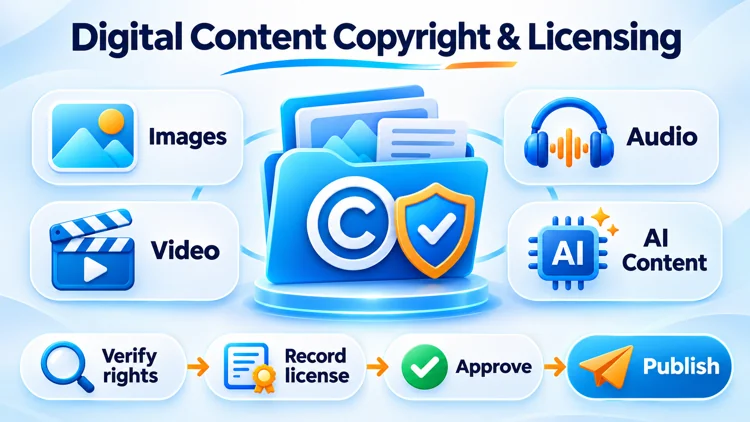
Publishing an image, video, audio clip or AI-generated asset on a business website involves more than uploading a file. Teams need to establish who owns the material, what uses are permitted, whether attribution is required and which records support that decision. A repeatable copyright and licensing process helps prevent publication delays, takedown disputes, unexpected licensing costs and reputational damage.
This operational guide is designed for website owners, marketing teams, content editors, SEO agencies and product managers. It covers licensing checks, Creative Commons, supplier content, user-generated content (UGC), AI outputs, CMS records and incident response. It is not legal advice: copyright rules and contract terms vary by jurisdiction and use case.
1. Copyright, licensing and permission: what is the difference?
Copyright generally protects qualifying original expression. A license is permission to use protected material under particular conditions; it does not necessarily transfer ownership. A file being publicly accessible, appearing in search results or having no visible watermark does not establish that it can be reused commercially.
- Copyright owner: the person or organization entitled to authorize relevant uses, subject to applicable law and agreements.
- Licensee: the individual or organization permitted to use the asset within an agreed scope.
- Attribution: identifying the author or rights holder where required; giving credit does not replace permission.
- Public domain and exceptions: an asset may be usable without a license in some circumstances, but the status and applicable legal exceptions must be checked rather than assumed.
For example, buying a stock photograph usually grants specified usage rights; it does not mean the buyer owns its copyright. A supplier sending a product photo may also not have authority to authorize every advertising, resale or redistribution use.
2. Rights checks for images, video, audio and AI content
| Asset | Check before publication | Common risk |
|---|---|---|
| Images and graphics | Author/agency, stock license, commercial use, alterations, attribution, people or trademarks depicted | Using editorial-only or unlicensed images in ads |
| Video | Footage, soundtrack, voiceover, releases, footage libraries and platform distribution rights | Cleared footage but unlicensed background music |
| Audio | Composition, sound recording, performance and synchronization or distribution rights as applicable | Assuming a paid music subscription covers advertising |
| AI-generated media | Tool terms, input permissions, identifiable people, likeness, trademark issues and similarity to protected works | Assuming generated output is automatically exclusive or risk-free |
| Supplier and UGC assets | Submitting party's authority, granted channels, duration and evidence | Reposting a customer or vendor's content without sufficient permission |
Different layers of rights can coexist. A photo of a person, a branded product image or a video with music may require additional permissions beyond the primary copyright license. Escalate uncertain commercial uses to the appropriate legal or rights specialist.
3. Understanding Creative Commons licenses
Creative Commons offers six main copyright licenses. Their conditions are not interchangeable. BY requires attribution, SA governs how adaptations are shared, NC restricts commercial uses and ND restricts sharing adaptations. Verify the exact version and the license stated by the rights holder.
| License | Commercial reuse? | Adapt and share? | Key obligation |
|---|---|---|---|
| CC BY | Yes | Yes | Attribution |
| CC BY-SA | Yes | Yes | Attribution; share adaptations under compatible same-license terms |
| CC BY-ND | Yes | No sharing of adaptations under this license | Attribution; distribute unadapted material |
| CC BY-NC | No, without separate permission | Yes for noncommercial purposes | Attribution; noncommercial restriction |
| CC BY-NC-SA | No, without separate permission | Yes for noncommercial purposes | Attribution; share-alike requirement |
| CC BY-NC-ND | No, without separate permission | No sharing of adaptations under this license | Attribution; noncommercial and no-derivatives restrictions |
Important: CC0 is a separate public-domain dedication, not a seventh CC copyright license. The meaning of commercial use and what constitutes an adaptation can be context-sensitive. Read the actual license and do not assume that attribution alone makes otherwise prohibited uses permissible. Reference: Creative Commons license overview.
4. A seven-step pre-publication licensing SOP
- Register the asset: record its filename, asset ID, source URL, submission date, owner and intended page or campaign.
- Identify the rights holder: establish who made the asset and whether the party granting permission is authorized to do so.
- Confirm the intended use: website, email, social post, paid advertising, translation, cropping, AI transformation or syndication may have different permissions.
- Inspect license conditions: channels, territories, term, modification rights, attribution, seat limits, impression limits and any editorial-only restrictions.
- Collect evidence: preserve the agreement, email authorization, purchase receipt, license page and applicable terms or version captured at the time of approval.
- Approve or escalate: the editor confirms routine items; unresolved rights, sensitive subjects and campaign use receive specialist review.
- Publish and monitor: save the approval record, render required credit, and flag license changes or expiry for follow-up.
Decision rule: if the business cannot support its right to use an asset for the planned purpose, hold publication until the missing information is resolved. This is a prudent internal control, not a claim that all material always requires a license.
5. License metadata and evidence in a CMS
A simple rights register can sit in a database, DAM (digital asset management system) or linked spreadsheet. Keep operational records separate from public SEO metadata unless public attribution is appropriate.
| Suggested field | Purpose |
|---|---|
asset_id, source_url |
Unique identifier and original source |
creator_name, rights_holder |
Author and organization entitled to grant rights |
license_type, license_version |
Stock, CC, custom contract, owned asset or another basis |
usage_scope, restrictions |
Authorized channels, modifications, geographic scope and other limits |
credit_text, license_url |
Required attribution and public license reference |
valid_from, expiry_date |
Effective and end dates, if applicable; leave empty for rights without a stated expiry |
evidence_location, approved_by |
Secured proof and approving reviewer |
review_status, reviewed_at |
Pending, approved, restricted, rejected and latest review |
Expiry automation: where an actual expiry date exists, notify the responsible editor before the end date and suspend affected uses if renewal has not been confirmed. Do not set every license to expire automatically: some permissions are perpetual or governed by other conditions. Restrict access to confidential agreements and personal data.
6. User-generated and supplier-provided content
A checkbox may help document a contributor's representations, but it is not proof that they truly control every right in an asset. Pair submission terms with review and escalation procedures.
- State which uses are requested: website publication, editing, promotion, ads, social reposts and cross-border distribution as appropriate.
- Keep evidence of the contributor's acceptance and the license text shown at submission, subject to privacy requirements.
- For supplier catalogs, confirm whether the supplier may authorize reuse of manufacturer photos, logos and promotional video.
- For testimonials or recognizable people, check privacy, publicity and consent issues separately from copyright.
- Provide a clear reporting channel for owners who believe an asset has been used without authorization.
7. AI-generated content: inputs, outputs and ownership
AI-generated media requires its own review. Using a generative tool does not automatically resolve copyright ownership, originality, likeness or trademark issues. Relevant law differs by jurisdiction. For example, the U.S. Copyright Office has explained that sufficiently human-authored expressive contributions may be protected, while prompts alone do not necessarily establish authorship. See its January 2025 AI copyright report announcement.
- Check source permissions: do not upload confidential or third-party materials when the tool terms, contractual obligations or applicable law do not permit it. Copyrighted status alone does not answer every permitted-use question.
- Review tool terms: check commercial-use rights, restrictions, privacy settings and whether special terms apply to enterprise accounts.
- Examine the result: look for copied text, recognizable trademarks, real-person likenesses, misleading claims or close similarity to known protected material.
- Record material details: keep the tool, date, responsible editor and necessary generation history, without exposing sensitive prompts or personal data.
- Apply editorial review: validate factual claims and decide whether disclosure helps the audience or is legally or contractually required.
Google advises reviewing AI-assisted web content for accuracy, quality and relevance, including titles, structured data and image alt text. It does not say that adding AI labels or special schema guarantees higher rankings or AI citations. See Google Search Central's AI-content guidance.
8. Example of a simple asset-license clause
“Licensor grants Licensee a [non-exclusive/exclusive] license to use the identified asset [asset description and ID] for [specified website, marketing channels and purposes] in [territory] for [duration]. The permitted modifications are [list]. The required attribution is [credit text or none]. Further sublicensing, paid advertising or redistribution is [permitted/prohibited, as specified]. Licensor confirms its authority to grant the stated rights, subject to the representations and limits agreed by the parties.”
This is a drafting illustration rather than a ready-to-sign contract. Counsel should review ownership warranties, indemnities, termination, fees, model releases and governing law for the actual transaction.
9. Responding to copyright complaints or takedown notices
- Log and triage: record the complainant, disputed URL, asset ID, allegations and response deadline.
- Preserve relevant records: keep the licensed copy, contract, correspondence, publishing history and dated screenshots in a secure location.
- Assess temporary restriction: remove or restrict the disputed asset promptly when risk warrants it; follow applicable platform rules and legal requirements.
- Verify rights and seek advice: compare the complaint with actual license scope and involve legal counsel for contested or high-value claims.
- Resolve and document: replace, license, restore or permanently remove the material as appropriate, then record the decision and update the SOP.
Do not automatically send legal counter-notices or claim permissions that the organization cannot substantiate. Notice and counter-notice procedures vary by platform and jurisdiction.
10. Connecting copyright compliance with SEO, AEO and GEO
Rights governance protects the editorial supply chain; it is not a direct SEO ranking trick. For discoverability and credibility, teams can make factual attribution and publication details clear where relevant.
- Use accurate image alt text to describe visual content; do not stuff licensing keywords into alt attributes.
- Add an appropriate source credit or license link when required by the asset's conditions.
- Use relevant structured data only when it accurately describes publicly visible content and follows search-engine guidelines.
- Track provenance internally for audits. Private CMS fields are not automatically visible to AI search engines, and public metadata cannot guarantee AI citations.
- Place “Rights and Evidence Check” before the final editorial, technical SEO and publication approval stages.
11. Final publication checklist
- Asset ownership or applicable permission basis is documented.
- Planned website, marketing and advertising uses fit the license.
- Attribution, modification and sharing conditions have been followed.
- People, logos, music and other layered rights have been reviewed.
- AI inputs, tool terms and output risks have been assessed when relevant.
- Evidence and approver are recorded in the internal register.
- Any license expiry or conditional renewal has an owner and review date.
- The page has passed editorial quality and technical QA.
12. Frequently asked questions
Can I use an image just because it appears on Google Images?
No. Search visibility does not establish reuse rights. Check the underlying source and applicable license or legal exception.
Is crediting the creator enough?
Not necessarily. Attribution satisfies only the conditions that actually apply. A license may prohibit commercial reuse or modifications even when credit is provided.
Can a business use Creative Commons images?
Some CC licenses permit commercial use, while those containing NC restrict it. Teams must also consider attribution, adaptations and other rights attached to the asset.
Who owns an AI-generated image?
There is no universal answer. Tool contracts, applicable law and the level of human creative contribution matter. Assess rights before making an exclusivity or copyright claim.
How long should licensing records be retained?
Set a retention schedule based on applicable law, contract periods, business needs and data-protection obligations. Avoid a blanket universal period.
Conclusion
A dependable copyright workflow is built around verifying rights, recording evidence, obtaining approval and monitoring usage. Applying the same controls to images, video, audio, UGC and AI content helps businesses publish more consistently while reducing preventable disputes. Start with a rights register and a simple pre-publication gate, then expand the controls according to your team's risk profile.

Questions & Comments
You can ask a question about this article. Viet SEO will review and reply after moderation.